Categories
Links

Feudalism 2.0

Bruce Schneier has a clever piece discussing the contemporary model of ‘feudal security’, where user have committed themselves to differing lords of the Internet. As a taste:

Some of us have pledged our allegiance to Google: We have Gmail accounts, we use Google Calendar and Google Docs, and we have Android phones. Others have pledged allegiance to Apple: We have Macintosh laptops, iPhones, and iPads; and we let iCloud automatically synchronize and back up everything. Still others of us let Microsoft do it all. Or we buy our music and e-books from Amazon, which keeps records of what we own and allows downloading to a Kindle, computer, or phone. Some of us have pretty much abandoned e-mail altogether … for Facebook.

These vendors are becoming our feudal lords, and we are becoming their vassals. We might refuse to pledge allegiance to all of them – or to a particular one we don’t like. Or we can spread our allegiance around. But either way, it’s becoming increasingly difficult to not pledge allegiance to at least one of them.

Feudalism provides security. Classical medieval feudalism depended on overlapping, complex, hierarchical relationships. There were oaths and obligations: a series of rights and privileges. A critical aspect of this system was protection: vassals would pledge their allegiance to a lord, and in return, that lord would protect them from harm.

Of course, I’m romanticizing here; European history was never this simple, and the description is based on stories of that time, but that’s the general model.

And it’s this model that’s starting to permeate computer security today.

The rest of the piece is clever; highly recommend taking a read.
Categories
Writing

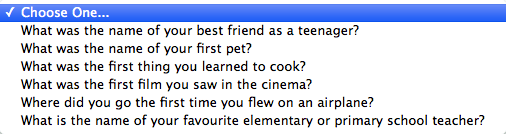
I need to create responses to the above security questions before I can purchase items through Apple’s digital stores. The problem: I actually don’t know the (legitimate/real) answers to any of the questions.

Admittedly the best security procedure, in the face of any vendor authentication questions, is to produce garbage/unrelated responses to any authentication questions that vendors ask. This said, it’s a a bit insane that I have to do this for the questions Apple has provided. Now, is this a problem that most people can overcome? Of course. They just write in answers and (somewhere) they write down their responses. I actually could use 1Password for this, a terrific password and identity manager that I highly recommend. This said, I’m not going to bother. Purchasing the $20 piece of software just isn’t worth the effort for me: in effect, Apple has succeeded in dissuading me from making an impulse purchase. That’s really not great for the business of app developers (Apple, really, doesn’t care that much given the relative amount that the app store contributes to their overall yearly profits).

You might wonder why these questions are being asked. I suspect they’re largely in response to the Mat Honan hack. In short, a Wired reporter’s Apple, Amazon, Twitter, and Google accounts were hacked so a third-party could masquerade as Mat on Twitter. This led to a ridiculous level of criticism in the press concerning how Apple authenticated users’ identities. I have no doubt that these questions – again, pictured above – are largely meant to better authenticate users and thus avoid identity fraud.

The problem of authentication fraud can be devilishly hard for companies to address. In the case of Apple, there is no option for the user to generate their own questions and responses. This might be seen as good security amongst ‘professionals’ – it prevents really, really crappy questions and easily found responses – but it creates an incredibly poor user experience. While writing down passwords isn’t the horrific nightmare scenario that some security analysts declare, expecting people to find those responses when they’re in trouble – such as their accounts have been hacked – will meet mixed results at best. Further, given how other companies tend to follow Apple’s lead(s) it’s only a matter of time until more and more (less security conscious) companies adopt similar or identical security questions/answers. Such adoptions will limit the relative novelty of Apple’s authentication questions and thus reduce their capability to genuinely authenticate users’ identities. Consequently, such questions (in the short and long terms) will likely just leave its customers frustrated.

Ultimately, this kind of authentication really is less than ideal; more nuanced and (to the user) transparent analytics protocols to detect aberrant behaviours and then recover accounts would be far, far superior to what Apple is presently rolling out. Hopefully it doesn’t take further authentication failures, on Apple’s part, for them to realize the error of their ways and correct it.

Categories
Links

iMessage and ‘Secure’ Communications

Matthew Green has a good piece that discusses some of the security concerns around iMessage. Specifically he speaks to how, despite Apple’s assurances that it employs “secure end-to-end encryption,” the company still hasn’t properly explained how its encryption processes are established or deployed. Green does a good job explaining these concerns for a very non-technical audience. Highly recommended, especially if you happen to be using iMessage.

Categories
Aside

2012.7.28

I’m typing this post while connected to my Time Capsule router. You’d never know that from looking at the Airport Utility, which can’t identify the router on the network. Never run into this problem before updating to Snow Lion.

Fun aside: last night my MBP couldn’t find its backup images on the router. The ‘solution’ was to delete the existing image bundle on the Time Capsule – I could navigate to them in Finder – and then OSX could see the Time Capsule and backup to it.

Categories
Writing

As an early adopter I know that I’ll stumble into bugs and problems in Apple’s newest OS. The first I’m come across stems from Safari’s integration with Twitter.

Note in that in image on the left there is no ability to cancel a tweet once you click send. I suspect that I’m running into this problem because Twitter is presently (at the time of this screenshot/writing) experiencing downtime. Regardless, the inability to cancel the tweet is particularly inconvenient because the send tweet window hovers over all Safari tabs (as seen in the right-hand image).

This persistent hovering means that if integration with Twitter stalls then Safari ceases to be a useful browser until the send attempt times out. Ideally a future patch will link the ‘send to Twitter’ window with the specific tab the tweet is being sent from, as well as ensure that users can cancel tweets at all times. Hopefully we see a point upgrade soon, to iron out this and other bugs that are being reported across the ‘net.

Categories
Writing

Comment on Lion’s Internet Recovery

I’ve recently added a new non-spinning disk to my system and decided to give Lion’s disk recovery system a try: how did it actually perform, where were there problems, and how were they resolved?

I was incredibly impressed with the general functionality of the Internet-based recovery mechanism. After adding the new disk I was asked to connect to a local wireless network and then basic recovery data was streamed into RAM. From there I successfully downloaded and installed the OS, and restored files and settings from encrypted network storage. Total time to restore the OS and about 200GB of data: 3.5 hours.

Were there any problems? Yes, though only one is truly significant to my mind. While the password for logging into the OS remained the drive encryption that I’d set up through the OS (i.e. Filevault 2) had to be re-intitialized. When I attempted to do so I received warnings that the disk could not be encrypted.

This constituted a major problem for me.

The solution was relatively simple, though annoying. Apparently the Internet-based recovery process fails to install a recovery partition on the disk. Without this partition Filevault 2 cannot be enabled. The solution was to reinstall Lion from within the OS. This doesn’t change any settings and, effectively, is just used to create the disk-based recovery partition. After the partition is set up Filevault 2 can be enabled without a problem.

I don’t have a particular issue with having to jump through some hoops to re-enable the disk encryption. I do, however, have issues with the fact that there are no warnings that this security setting isn’t enabled/carried through when re-installing Lion and importing data and settings from a Time Capsule. In effect, if I wasn’t poking around settings to ascertain whether they had been carried over I likely would have never known that the disk hadn’t been encrypted. This is a particularly serious information flow error as far as I’m concerned. Hopefully Apple will integrate some kind of a notice system in the future to alert users about which settings were and were not carried over, as well as more verbosity concerning why Filevault 2 cannot be enabled after an Internet-based OS restoration.

Categories
Writing

Why I Can’t Recommend gfxCardStatus

A recent Ars Technica article got me interested in a neat piece of donation-ware called gfxCardStatus. See, contemporary 15″ Macbook Pros have two GPUs. One is discrete and the other is integrated. The theory is that when you’re on battery power you’re more likely to hop over to the integrated GPU to save battery, though whenever you need the power of the discrete GPU you have a seamless transition over to it.

This is really cool in principle. Unfortunately it never seems to work out very well.

Ars notes that there are a whole series of frameworks that cause OS X to transition to the discrete GPU. Many of these frameworks are routinely used by such graphic-intense programs as Twitter, Reeder, and Skype. Consequently, if you have these open you don’t enjoy the battery savings associated with the integrated GPU.

The proposed solution is gfxCardStatus, which lets you force the OS to use either the discrete or integrated GPU. You can also let OS X run things and maintain dynamic switching. This is handy: it increased my battery life some by letting me choose the GPU I wanted to run.

The program is less handy insofar as it breaks the ability to use a second monitor. While annoying to troubleshoot in an office setting, it’s incredibly problematic when I can’t connect to a projector when giving a presentation.

I don’t know if this is a regular or abnormal problem. I do know that it’s a deal breaker for me: a little more battery life doesn’t – can’t – justify breaking core OS functionality.

Categories
Aside Links

SandForce Controllers and Encryption

Rob Graham has a good look at the challenges facing SandForce controllers – which are used by a large number of the solid state hard drives on the consumer market – as related to disk encryption. I highly recommend reading it but, if you just don’t have the time, here’s the key takeaway: “The problem with a SandForce controller is that all its features are lost when using full disk encryption, but all its downsides remain. Thus, if you plan on using an SSD for your notebook computer, you should plan on getting something other than a SandForce controller.”

Categories
Writing

Did Apple Design in the Wrong Direction?

It’s a big deal whenever Apple refreshes the design of their products. It isn’t just that the media goes nuts, but that other parties (read: the media) tend to swoon about Apple’s decision and the company’s competitors get ready to ape Apple’s new paradigms.

Unfortunately, the switch to the newly designed Airport Express seems like a terrific step in the wrong direction from a design perspective, while simultaneously being in the right direction from a product alignment perspective. Let me explain.

While some sites have stated that the older Express routers were ‘wall warts’, anyone who’s travelled with one of these routers can speak to their functionality. They were easy to pack, easier to set up, and incredibly reliable. The ‘warts’ were also useful when setting up wifi printing or Airplay functionality at home. In both of these latter cases, it was easy to move the router to where you wanted either the printer or speakers and didn’t necessitate cluttering up the space with unneeded cables.

The new form factor is better visually linked to Apple’s existing routers and Apple TV products. On these grounds, Apple is (arguably) bringing a superior branded identity to the Airport Express line, ensuring that anyone who sees the router will immediately think ‘Apple’. This has significant marketing and branding resonance but, unfortunately, it comes at the expense of device efficiency.

Good design is tightly linked with beauty, usability, and efficiency. In the case of the newest iteration of the Airport Express, Apple has prioritized the corporate image over product efficiency; the Express is a less efficient product on grounds that it assumes more physical space that has previously been needed. The incapacity to link these priorities is suggestive that the newest Apple router is a failed product from a design position, regardless of the popularity or sales of the new iteration.

Categories
Aside

Is Your Phone Being Wiretapped?