Categories
Solved

Solved: Setting Up a Nanoleaf Essentials A19 Smart Bulb with a Dimmer Switch

When we first moved into our apartment several years ago I purchased a bunch of ‘smarthome’ equipment. One of those items was a Nanoleaf Essentials A19 Smart Bulb.

It never really worked. At the time it was because our kitchen light was on a dimmer switch and — as I learned — smart lights do not tend to work (well) on dimmers. The only solution was to replace the switch or, instead, not be able to have a smart light.

We couldn’t replace out the switch given that we live in an apartment. And so the Smart Bulb instead acted as a (not very good) dumb bulb for several years. Until now.

The Issue

When I installed the Nanoleaf Essentials A19 Smart Bulb into the kitchen light that was on a dimmer switch I was able to turn on the Smart Bulb. However, I could never get it to connect to my smart home environment. This is a documented issue on Nanoleaf’s support webpage.

I exclusively use Apple products and, in this case, was unable to get the smart bulb to connect to Apple Home or to the Nanoleaf app.

The Environment

The items that I was dealing with included:

The Solution

Fortunately this ended up being a surprisingly easy thing for which to solve.

  1. Remove your Nanoleaf Essentials A19 Smart Bulb and record the 8-digit code that is below the QR code on the bulb.
  2. Remove front plate over the Lutron AYCL-153P Dimmer switch.
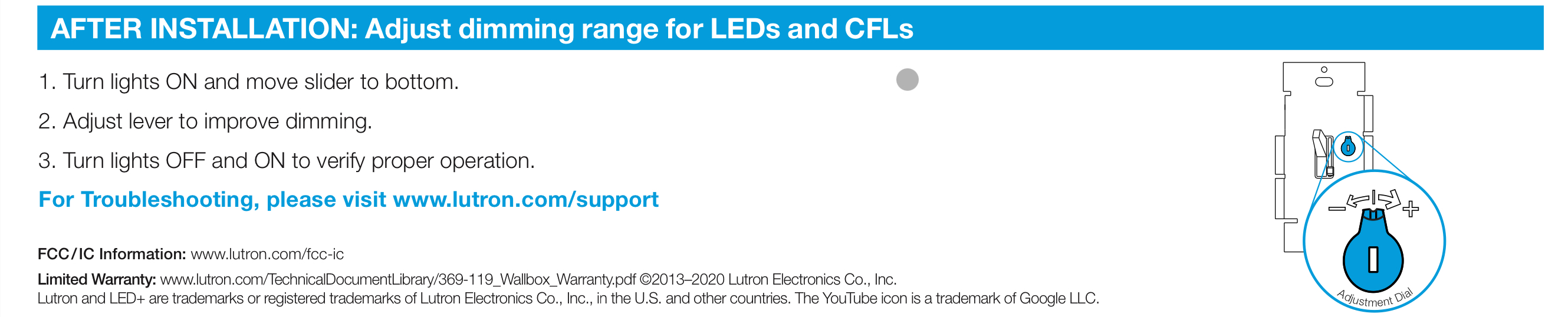
  3. There will be a small ‘dial’ that you can turn on the switch, to the right of the toggle switch. Turn it all the way to the right.1
  4. Factory reset your Nanoleaf Essentials A19 Smart Bulb2
  5. Disable the 5Ghz wifi radio temporarily on your Eero Pro 6. This involves: Open Eero App >> Settings >> Troubleshooting >> My Device Won’t Connect >> My Device is 2.4 GHz Only >> Click ‘Temporarily Pause 5GHz’. You must do this so that you can connect the Nanoleaf Essentials A19 Smart Bulb to your wireless network, because it only has a 2.4GHz radio.
  6. Add the device to Apple Home on an iOS device. This involves: Click the ‘ ’ icon in the upper right corner of the Apple Home app >> Add Accessory >> More options >> My Accessory Isn’t Shown Here >> Enter Code >> Continue >> Finalize adding the bulb to your Apple Home application.

You will now be able to access your Nanoleaf Essentials A19 Smart Bulb from Apple Home.

  1. IMG_0015
  2. From Nanoleaf: Turn off, wait for 3 seconds, turn back on for no more than 3 seconds. Repeat for a total of 5 power cycles. Bulb will flash red three times if successful. Note that it may take 2-3 second for this flashing to occur after the final power cycle. ↩︎
Categories
Links Writing

Older Adults’ Perception of Smart Home Technologies

Percy Campbell et al.’s article, “User Perception of Smart Home Surveillance Among Adults Aged 50 Years and Older: Scoping Review,” is a really interesting bit of work into older adults/ perceptions of Smart Home Technologies (SMTs). The authors conducted a review of other studies on this topic to, ultimately, derive a series of aggregated insights that clarify the state of the literature and, also, make clear how policy makers could start to think about the issues older adults associate with SMTs.

Some key themes/issues that arose from the studies included:

  • Privacy: different SMTs were perceived differently. But key was that the privacy concerns were sometimes highly contextual based on region, with one possible effect being that it can be challenging to generalize from one study about specific privacy interests to a global population
  • Collection of Data — Why and How: People were generally unclear what was being collected or for what purpose. A lack of literacy may raise issues of ongoing meaningful consent of collection.
  • Benefits and Risks: Data breaches/hacks, malfunction, affordability, and user trust were all possible challenges/risks. However, participants in studies also generally found that there were considerable benefits with these technologies, and most significantly they perceived that their physical safety was enhanced.
  • Safety Perceptions: All types of SHT’s were seen as useful for safety purposes, especially in accident or emergency. Safety-enhancing features may be preferred in SHT’s for those 50+ years of age.

Given the privacy, safety, etc themes, and how regulatory systems are sometimes being outpaced by advances in technology, they authors propose a data justice framework to regulate or govern SHTs. This entails:

  • Visibility: there are benefits to being ‘seen’ by SHTs but, also, privacy needs to be applied so individuals can selectively remove themselves from being visible to commercial etc parties.
  • Digital engagement/ disengagement: individuals should be supported in making autonomous decisions about how engaged or in-control of systems they are. They should, also, be able to disengage, or only have certain SHTs used to monitor or affect them.
  • Right to challenge: individuals should be able to challenge decisions made about them by SHT. This is particularly important in the face of AI which may have ageist biases built into it.

While I still think that there is the ability of regulatory systems to be involved in this space — if only regulators are both appropriately resourced and empowered! — I take the broader points that regulatory approaches should, also, include ‘data justice’ components. At the same time, I think that most contemporary or recently updated Western privacy and human rights legislation includes these precepts and, also, that there is a real danger in asserting there is a need to build a new (more liberal/individualistic) approach to collective action problems that regulators, generally, are better equipped to address than are individuals.