Categories
Links Writing

Some Literature on Skype Security

Chris Soghoian has a good piece breaking down what we know, and don’t know, about Skype’s VoIP security. While not mentioned, it’s helpful to keep in mind that the security and anonymity offered by Skype is questionable regardless of whether the company provides a private key/enables MITM/etc for law enforcement agencies. Such questions are, and have been raised by academics for some time, as evidenced by the body of academic research on Skype and security.

To be clear: the following list is not a comprehensive accounting of literature that has been critical of Skype or VoIP encryption. Instead, the list is meant to show that researchers have been evaluating Skype’s security promises for a very long time. The present controversy around Skype’s security stance – i.e. can or can’t the company decrypt VoIP communications for law enforcement – should be read as an ongoing part of this narrative instead of as a revelatory moment that “changes everything.”

Phonotactic Reconstruction of Encrypted VoIP Conversations: Hookt on fon-iks (2011)

Abstract: In this work, we unveil new privacy threats against Voice-over-IP (VoIP) communications. Although prior work has shown that the interaction of variable bit-rate codecs and length-preserving stream ciphers leaks information, we show that the threat is more serious than previously thought. In particular, we derive approximate transcripts of encrypted VoIP conversations by segmenting an observed packet stream into subsequences representing individual phonemes and classifying those subsequences by the phonemes they encode. Drawing on insights from the computational linguistics and speech recognition communities, we apply novel techniques for unmasking parts of the conversation. We believe our ability to do so underscores the importance of designing secure (yet efficient) ways to protect the confidentiality of VoIP conversations.

Analysis of information leakage from encrypted Skype conversations (2010)

Abstract: Voice over IP (VoIP) has experienced a tremendous growth over the last few years and is now widely used among the population and for business purposes. The security of such VoIP systems is often assumed, creating a false sense of privacy. This paper investigates in detail the leakage of information from Skype, a widely used and protected VoIP application. Experiments have shown that isolated phonemes can be classified and given sentences identified. By using the dynamic time warping (DTW) algorithm, frequently used in speech processing, an accuracy of 60% can be reached. The results can be further improved by choosing specific training data and reach an accuracy of 83% under specific conditions. The initial results being speaker dependent, an approach involving the Kalman filter is proposed to extract the kernel of all training signals.

Recovery of Skype Application Activity Data from Physical Memory (2010)

Abstract: The use of Internet based communication technologies has become more prevalent in recent years. Technologies such as Skype provide a highly secure and decentralised method of communication. These technologies may also leave little evidence on static media causing conventional digital forensic processes to be ineffective. This research looks at exploiting physical memory to recover evidence from Internet based communication technologies where conventional methods cannot. The paper first proposes a set of generic target artefacts that defines information that may be targeted for recovery and the meaning that can be inferred from this. A controlled test was then undertaken where Skype was executed and the memory from the target machine collected. The analysis showed that it is feasible to recover the target data as applied to Skype, which would not be otherwise available. As this is the first set of tests of a series, the future direction is also discussed.

Blocking Skype through Deep Packet Inspection (2009)

Abstract: Skype is a peer-to-peer (P2P) voice over IP (VOIP) chat program. It provides its clients with an inexpensive means to communicate worldwide via the Internet through wired and wireless networks. In the past this application was limited strictly to computers, yet with continuous advancements in mobile communication, Skype phones and other mobile devices have recently hit the market in an attempt to capitalize on Skype’s reliable connection algorithms. However, despite the success of this application, it is important to note that due to Skype’s connection algorithm and the nature of P2P, a number of vulnerabilities emerge that threaten both users and their networks. This paper outlines how to block the Skype application through the use of deep packet inspection. This novel approach is completely scalable to networks of any size as a means of blocking one of the largest threats to commercial and government networks today.

Identifying Skype Traffic by Random Forest (2007)

Abstract: Despite of the great popularity, little is known about Skype network attributed to proprietary protocol. End-to-end encryption disables the traditional traffic detection methods. We presented genetic algorithm based Random Forest algorithm to identify Skype traffic using only transport layer statistics. Experimental results show that the proposed approach can immune to the encryption of the payload and be capable of detecting Skype traffic with accuracy over 95% while low computational complexity is required.

Revealing skype traffic: when randomness plays with you (2007)

Abstract: Skype is a very popular VoIP software which has recently attracted the attention of the research community and network operators. Following a closed source and proprietary design, Skype protocols and algorithms are unknown. Moreover, strong encryption mechanisms are adopted by Skype, making it very difficult to even glimpse its presence from a traffic aggregate. In this paper, we propose a framework based on two complementary techniques to reveal Skypetraffic in real time. The first approach, based on Pearson’sChi-Square test and agnostic to VoIP-related trafficcharacteristics, is used to detect Skype’s fingerprint from the packet framing structure, exploiting the randomness introduced at the bit level by the encryption process. Conversely, the second approach is based on a stochastic characterization of Skype traffic in terms of packet arrival rate and packet length, which are used as features of a decision process based on Naive Bayesian Classifiers.In order to assess the effectiveness of the above techniques, we develop an off-line cross-checking heuristic based on deep-packet inspection and flow correlation, which is interesting per se. This heuristic allows us to quantify the amount of false negatives and false positives gathered by means of the two proposed approaches: results obtained from measurements in different networks show that the technique is very effective in identifying Skype traffic. While both Bayesian classifier and packet inspection techniques are commonly used, the idea of leveraging on randomness to reveal traffic is novel. We adopt this to identify Skype traffic, but the same methodology can be applied to other classification problems as well.

VoIP and Skype Security (2005)

A critical evaluation of Skype’s security stance as juxtaposed against other peer-to-peer models, ISDN/VoIP services, and what we can take away from Skype’s claims about encryption and voice security.

Skype Security Evaluation (2005)

Since 1 June 2005 I have been analyzing the security properties of Skype software and services, with a focus on the current and planned uses of cryptography. I have had unimpeded access to Skype engineers and to Skype source code. I have found out a lot about Skype. The more I found out, the happier I became.

Any pieces of literature you think are absolute must adds to this list?

Categories
Aside

2012.7.28

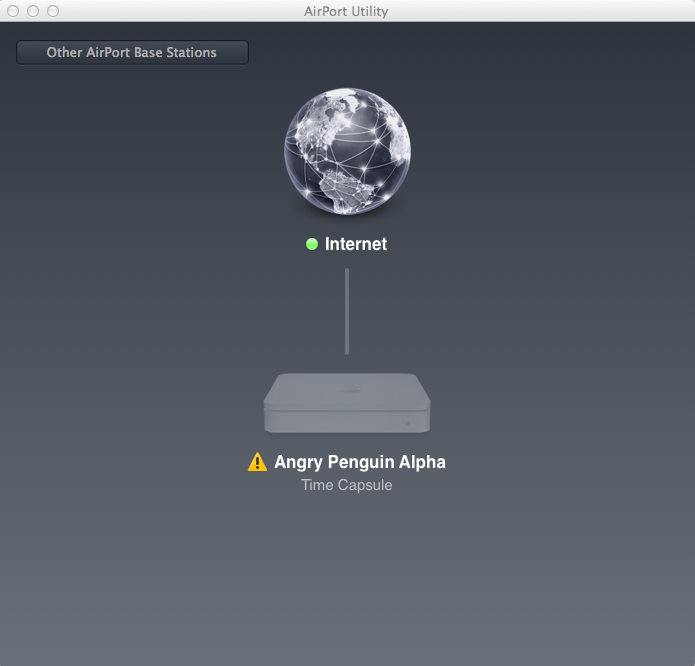
I’m typing this post while connected to my Time Capsule router. You’d never know that from looking at the Airport Utility, which can’t identify the router on the network. Never run into this problem before updating to Snow Lion.

Fun aside: last night my MBP couldn’t find its backup images on the router. The ‘solution’ was to delete the existing image bundle on the Time Capsule – I could navigate to them in Finder – and then OSX could see the Time Capsule and backup to it.

Categories
Links

The Pwnies Are Out

I admit to having a preference for the attack on MySQL. The description:

“Are we there yet?” MySQL Authentication Bypass (CVE-2012-2122)

Credit: Sergei Golubchik

On vulnerable versions of MySQL simply asking to authenticate repeatedly enough times is enough to bypass authentication: “Can I log in as root now?”
”How about now?”
”Now?”

That said, the various nominees for Epic Ownage are pretty hilarious as well:

“Flame” Windows Update MD5 Collision Attack

Flame Authors

Any attack that requires a breakthrough in cryptography to pull off is pretty cool in our book. And being able to pwn any Windows machine through Windows Update is pretty mass 0wnage.

Certificate Authorities

Everyone

It turns out that Certificate Authorities themselves are one massive security vulnerability. How many more CAs need to get popped before we as an industry realize that allowing Bob’s Bait, Tackle, and Certificates to issue wildcard certificates is a bad idea?

iOS Jailbreaks

iPhone Dev Team and Chronic Dev Team

We love the jailbreakers and you should too. They publicly drop all of their exploits as 0day, convince millions of users to disable the security features on their own devices, and then keep those devices vulnerable to the released exploits until new exploits can be developed and released in the patched versions of iOS.

It’s been a ‘good’ year for massive security deficits. Check up on the Pwnies – and watch the various streams from the summer’s security conferences – to appreciate why pencil and paper (or, barring that, actual fiscal and legal liability for writing bad code) is an ever-appealing idea.

Categories
Writing

As an early adopter I know that I’ll stumble into bugs and problems in Apple’s newest OS. The first I’m come across stems from Safari’s integration with Twitter.

Note in that in image on the left there is no ability to cancel a tweet once you click send. I suspect that I’m running into this problem because Twitter is presently (at the time of this screenshot/writing) experiencing downtime. Regardless, the inability to cancel the tweet is particularly inconvenient because the send tweet window hovers over all Safari tabs (as seen in the right-hand image).

This persistent hovering means that if integration with Twitter stalls then Safari ceases to be a useful browser until the send attempt times out. Ideally a future patch will link the ‘send to Twitter’ window with the specific tab the tweet is being sent from, as well as ensure that users can cancel tweets at all times. Hopefully we see a point upgrade soon, to iron out this and other bugs that are being reported across the ‘net.

Categories
Links Writing

Origin Stories and the Internet

There are a large list of origin stories and myths surrounding the ‘net. Some are far better than others. Given a recent (significantly misguided) piece by WSJ a quick couple of responses have gone up at Ars (not bad, not great) and by Robert Graham (pretty good). I’m not going to write an origin myth – though I’ve got one that I’m writing for future publication, and have been ‘teaching the myth’ to students of late – but in no particular order is a list of good/interesting books on the topic.

Categories
Aside Humour

Leahy & Time Warner Comic

Categories
Writing

Comment on Lion’s Internet Recovery

I’ve recently added a new non-spinning disk to my system and decided to give Lion’s disk recovery system a try: how did it actually perform, where were there problems, and how were they resolved?

I was incredibly impressed with the general functionality of the Internet-based recovery mechanism. After adding the new disk I was asked to connect to a local wireless network and then basic recovery data was streamed into RAM. From there I successfully downloaded and installed the OS, and restored files and settings from encrypted network storage. Total time to restore the OS and about 200GB of data: 3.5 hours.

Were there any problems? Yes, though only one is truly significant to my mind. While the password for logging into the OS remained the drive encryption that I’d set up through the OS (i.e. Filevault 2) had to be re-intitialized. When I attempted to do so I received warnings that the disk could not be encrypted.

This constituted a major problem for me.

The solution was relatively simple, though annoying. Apparently the Internet-based recovery process fails to install a recovery partition on the disk. Without this partition Filevault 2 cannot be enabled. The solution was to reinstall Lion from within the OS. This doesn’t change any settings and, effectively, is just used to create the disk-based recovery partition. After the partition is set up Filevault 2 can be enabled without a problem.

I don’t have a particular issue with having to jump through some hoops to re-enable the disk encryption. I do, however, have issues with the fact that there are no warnings that this security setting isn’t enabled/carried through when re-installing Lion and importing data and settings from a Time Capsule. In effect, if I wasn’t poking around settings to ascertain whether they had been carried over I likely would have never known that the disk hadn’t been encrypted. This is a particularly serious information flow error as far as I’m concerned. Hopefully Apple will integrate some kind of a notice system in the future to alert users about which settings were and were not carried over, as well as more verbosity concerning why Filevault 2 cannot be enabled after an Internet-based OS restoration.

Categories
Writing

Windows 8 has a new design paradigm; to find programs’  settings you must hover your cursor to the right of the screen. There is no indication that these settings panels exist.

The new paradigm can be contrasted against the ‘early’ Metro paradigm in Windows Phone. Under the ‘old’ paradigm ellipses are used to indicate additional options. The translation of Metro to the desktop – insofar as ellipses are being removed – strikes me as a poor decision for two reasons:

  1. It breaks Metro UI tenants that Windows Phone users have learned;
  2. The Mail settings aren’t linked with any OS-wide settings (so far as I can tell), which means that if you don’t figure out the ‘hover to the right’ paradigm you can spend considerable time getting frustrated trying to just add a new mail account.

There has to be some indication to users that additional information (i.e. the settings panel) exists or the settings should be accessible in multiple locations. Failure to accommodate these needs should be understood as design failures insofar as UI parsimony is damaging the overall UX.

Categories
Writing

Why I Can’t Recommend gfxCardStatus

A recent Ars Technica article got me interested in a neat piece of donation-ware called gfxCardStatus. See, contemporary 15″ Macbook Pros have two GPUs. One is discrete and the other is integrated. The theory is that when you’re on battery power you’re more likely to hop over to the integrated GPU to save battery, though whenever you need the power of the discrete GPU you have a seamless transition over to it.

This is really cool in principle. Unfortunately it never seems to work out very well.

Ars notes that there are a whole series of frameworks that cause OS X to transition to the discrete GPU. Many of these frameworks are routinely used by such graphic-intense programs as Twitter, Reeder, and Skype. Consequently, if you have these open you don’t enjoy the battery savings associated with the integrated GPU.

The proposed solution is gfxCardStatus, which lets you force the OS to use either the discrete or integrated GPU. You can also let OS X run things and maintain dynamic switching. This is handy: it increased my battery life some by letting me choose the GPU I wanted to run.

The program is less handy insofar as it breaks the ability to use a second monitor. While annoying to troubleshoot in an office setting, it’s incredibly problematic when I can’t connect to a projector when giving a presentation.

I don’t know if this is a regular or abnormal problem. I do know that it’s a deal breaker for me: a little more battery life doesn’t – can’t – justify breaking core OS functionality.

Categories
Aside Links

SandForce Controllers and Encryption

Rob Graham has a good look at the challenges facing SandForce controllers – which are used by a large number of the solid state hard drives on the consumer market – as related to disk encryption. I highly recommend reading it but, if you just don’t have the time, here’s the key takeaway: “The problem with a SandForce controller is that all its features are lost when using full disk encryption, but all its downsides remain. Thus, if you plan on using an SSD for your notebook computer, you should plan on getting something other than a SandForce controller.”