I’m an amateur Toronto-based documentary and street photographer, and have been making images on the street for over a decade. In the fall of 2023 I purchased a used Leica Q2. I’d wanted the camera for a while, but it wasn’t until late 2023 that I began running into situations where I’d benefit from a full-frame sensor. Since then I’ve been going out and making images with it at least once a week for hours at a time and have made tens of thousands of frames in all kinds of weather.
In this post I discuss my experiences using the Leica Q2 in a variety of weather conditions to make monochromatic JPG images. I tend to exclusively use either single-point autofocus or zone focusing, and either multi-field or highlight-weighted exposure modes, generally while using aperture priority at 1/500s to freeze action on the street. My edits to images have, previously, used Apple Photos and now rely on the Darkroom app on my iPad Pro. You can see the kinds of images that I’ve been making on my Glass profile.
I’m a street photographer and have taken tens of thousands of images over the past decade. For the past couple years I’ve moved my photo sharing over to Glass, a member-paid social network that beautifully represents photographers’ images and provides a robust community to share and discuss the images that are posted.
I’m a big fan of Glass and have paid for it repeatedly. I currently expect to continue doing so. But while I’ve been happy with all their new features and updates previously, the newly announced computer vision-enabled search is a failure at launch and should be pulled from public release.
To be clear: I think that this failure can (and should) be rectified and this post documents some of the present issues with Glass’ AI-enabled search so their development team can subsequently work to further improve search and discoverability on the platform. The post is not intended to tarnish or otherwise belittle Glass’s developers or their hard work to build a safe and friendly photo sharing platform and community.
Trust and Safety and AI technologies
It’s helpful to start with a baseline recognition that computer vision technologies tend to be, at their core, anti-human. A recent study of academic papers and patents revealed how computer vision research fundamentally strips individuals of their humanity by way of referring to them as objects. This means that any technology which adopts computer vision needs to do so in a thoughtful and careful way if it is to avoid objectifying humans in harmful ways.
But beyond that, there are key trust and safety issues that are linked to AI models which are relied upon to make sense of otherwise messy data. In the case of photographs, a model can be used to subsequently enable queries against the photos, such as by classifying men or women in images, or classifying different kinds of scenes or places, or so as to surface people who hold different kinds of jobs. At issue, however, is thatmanyofthe popular AI models have deep or latent biases — queries for ‘doctors’ surface men, ‘nurses’ women, ‘kitchens’ associated with images including women, ‘worker’ surfacing men — or they fundamentally fail to correctly categorize what is in the image, with the result of surfacing images that are not correlated with the search query. This latter situation becomes problematic when the errors are not self-evident to the viewer, such as when searching for one location (e.g., ‘Toronto’) reveals images of different places (e.g., Chicago, Singapore, or Melbourne) but that a viewer may not be able to detect as erroneous.
Bias is a well known issue amongst anyone developing or implementing AI systems. There are numerous ways to try to technically address bias as well as policy levers that ought to be relied upon when building out an AI system. As just one example, when training a model it is best practice to include a dataset card, which explains the biases or other characteristics of the dataset in question. These dataset cards can also explain to future users or administrators how the AI system was developed so future administrators can better understand the history behind past development efforts. To some extent, you can think of dataset cards as a policy appendix to a machine language model, or as the ‘methods’ and ‘data’ section of a scientific paper.
Glass, Computer Vision, and Ethics
One of Glass’ key challenges since its inception has been around onboarding and enabling users to find other, relevant, photographers or images. While the company has improved things significantly over the past year there was still a lot of manual work to find relevant work, and to find photographers who are active on the platform. It was frustrating for everyone and especially to new users, or when people who posted photos didn’t categorize their images with the effect of basically making them undiscoverable.
One way to ‘solve’ this has been to apply a computer vision model that is designed to identify common aspects of photos — functionally label them with descriptions — and then let Glass users search against these aspects or labels. The intent is positive and, if done well, could overcome a major issue in searching imagery both because the developers can build out a common tagging system and because most people won’t take the time to provide detailed tags for their images were the option provided to them.
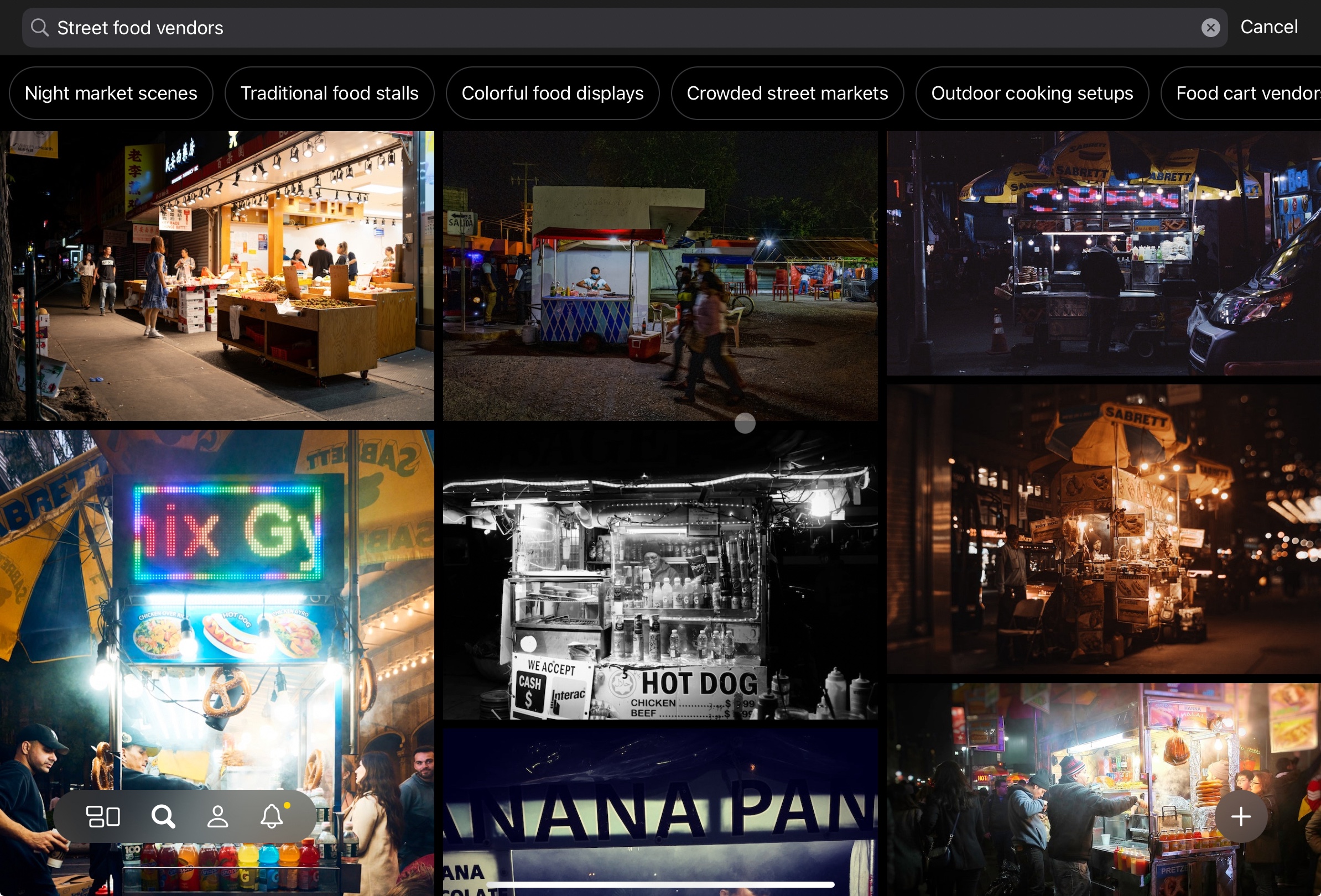
Sometimes the system seems to work pretty well. Searching for ‘street food vendors’ pulls up pretty accurate results.
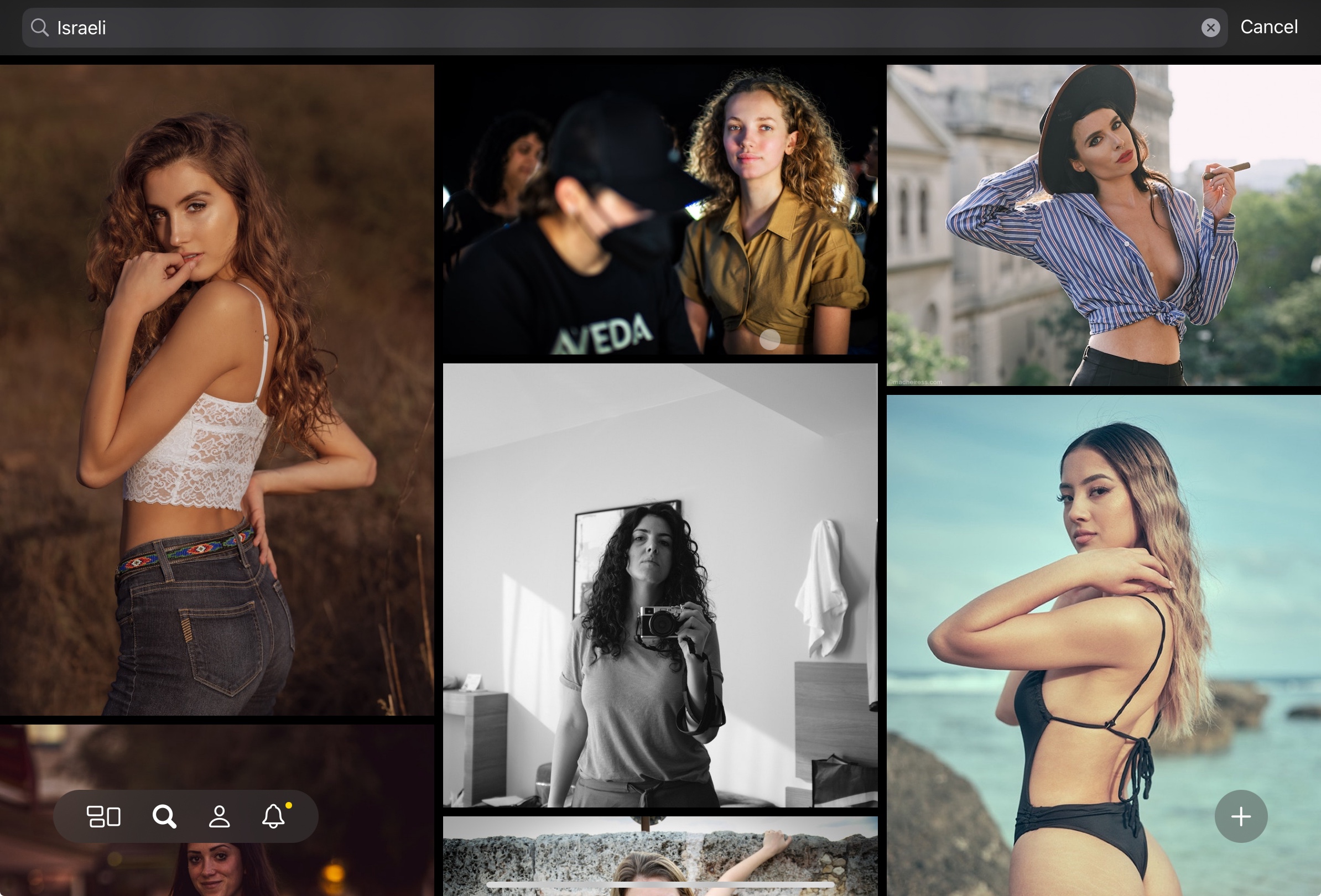
However, when I search for ‘Israeli’ I’m served with images of women. When I open them up there is no information suggesting that the women are, in fact, Israeli, and in some cases images are shot outside of Israel. Perhaps the photographers are Israeli? Or there is location-based metadata that geolocates the images to Israel? Regardless, it seems suspicious that this term almost exclusively surfaces women.
Searching ‘Arab’ also brings up images of women, including some who are in headscarves. It is not clear that each of the women are Arabic. Moreover, it is only after 8 images of women are presented is a man in a beard shown. This subject, however, does not have any public metadata that indicates he is, or identifies as being, Arabic.
Similar gender-biased results happen when you search for ‘Brazillian’, ‘Russian’, ‘Mexican’, or ‘African’. When you search for ‘European’, ‘Canadian’, ‘American’, ‘Japanese’, however, you surface landscapes and streetscapes in addition to women.
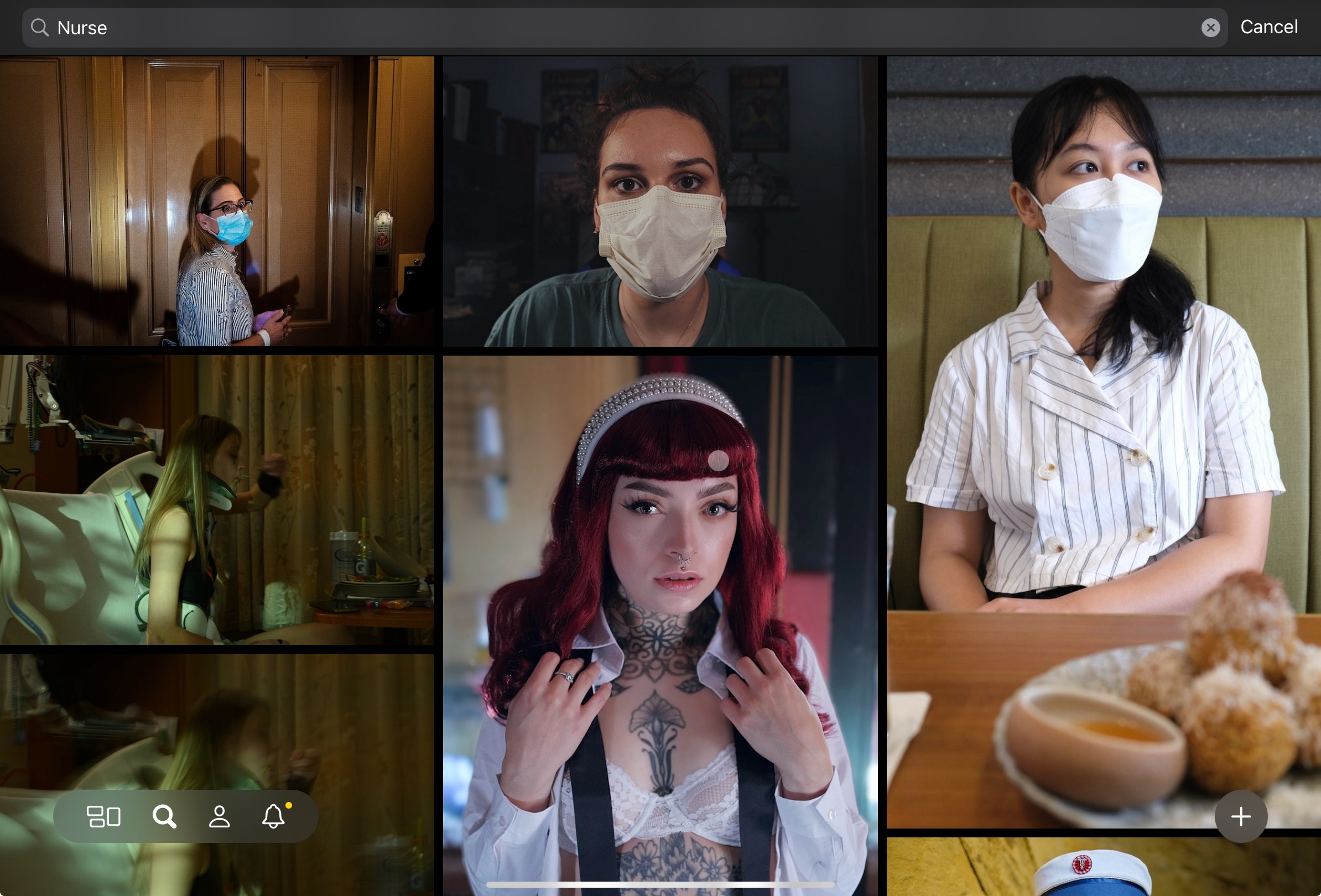
Other searches produce false results. This likely occurs because the AI model has been trained that certain items in scenes are correlated to concepts. As an example, when you search for ‘nurse’ the results are often erroneous (e.g., this photo by L E Z) or link a woman in a face mask to being a nurse. There are, of course, also just sexualized images of women.
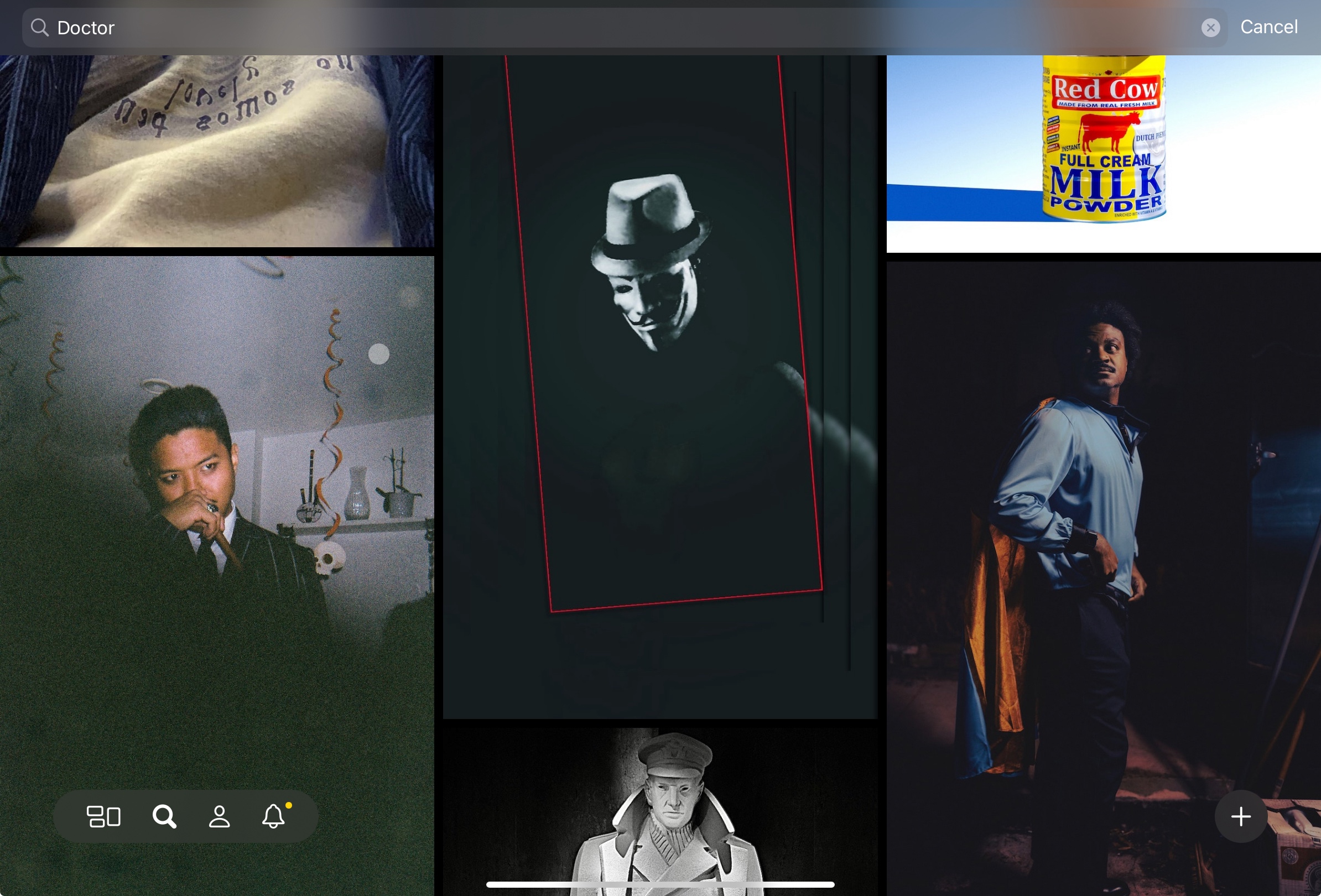
When searching for ‘doctor’ we can see that the model likely has some correlation between a mask and being a doctor but, aside from that, the images tend to return male subjects as images. Unlike ‘nurse’ there are no sexualized images of men or women that immediately are surfaced.
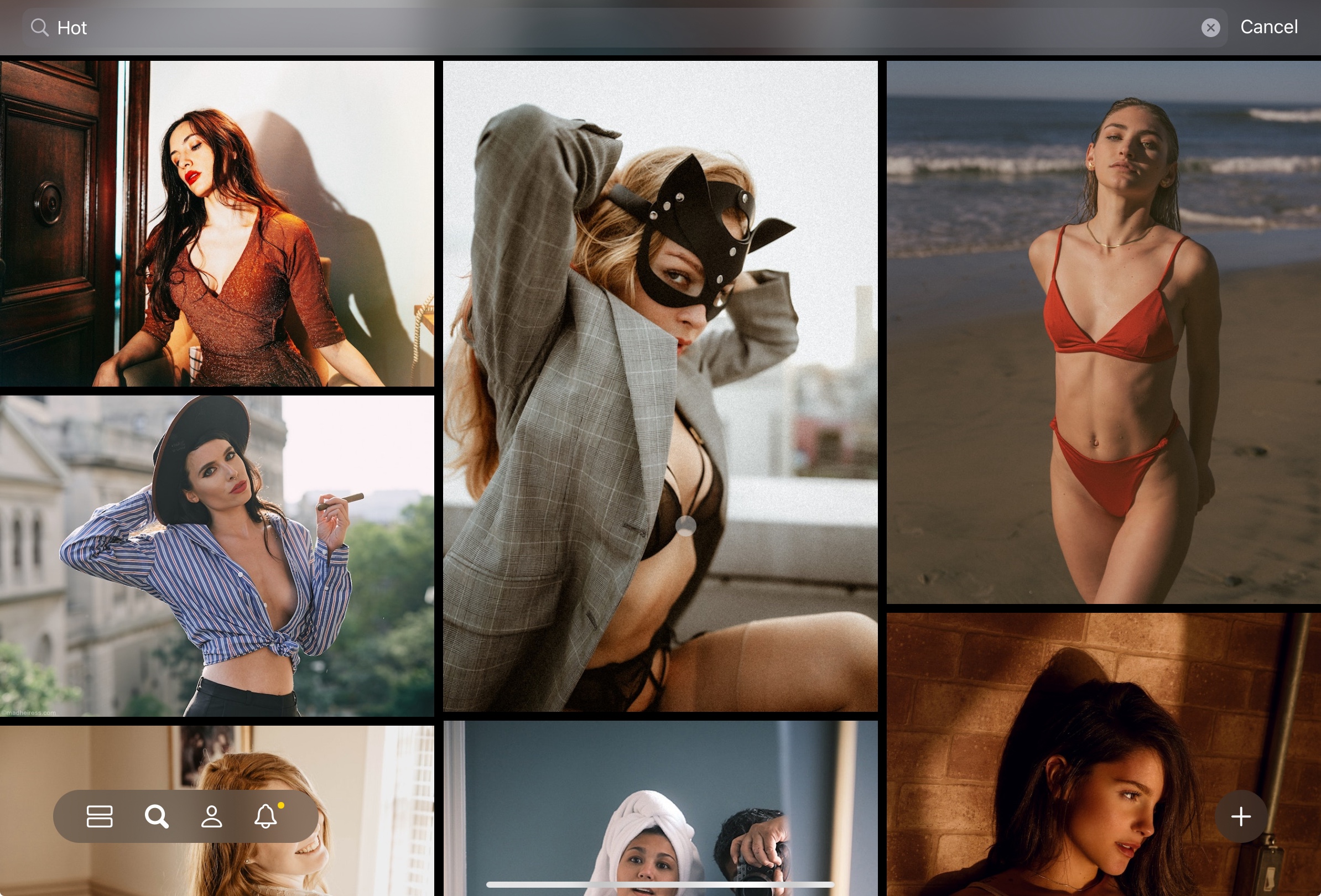
Also, if you do a search for ‘hot’ you are served — again — with images of sexualized women. While the images tend to be ‘warm’ colours they do not include streetscapes or landscapes.
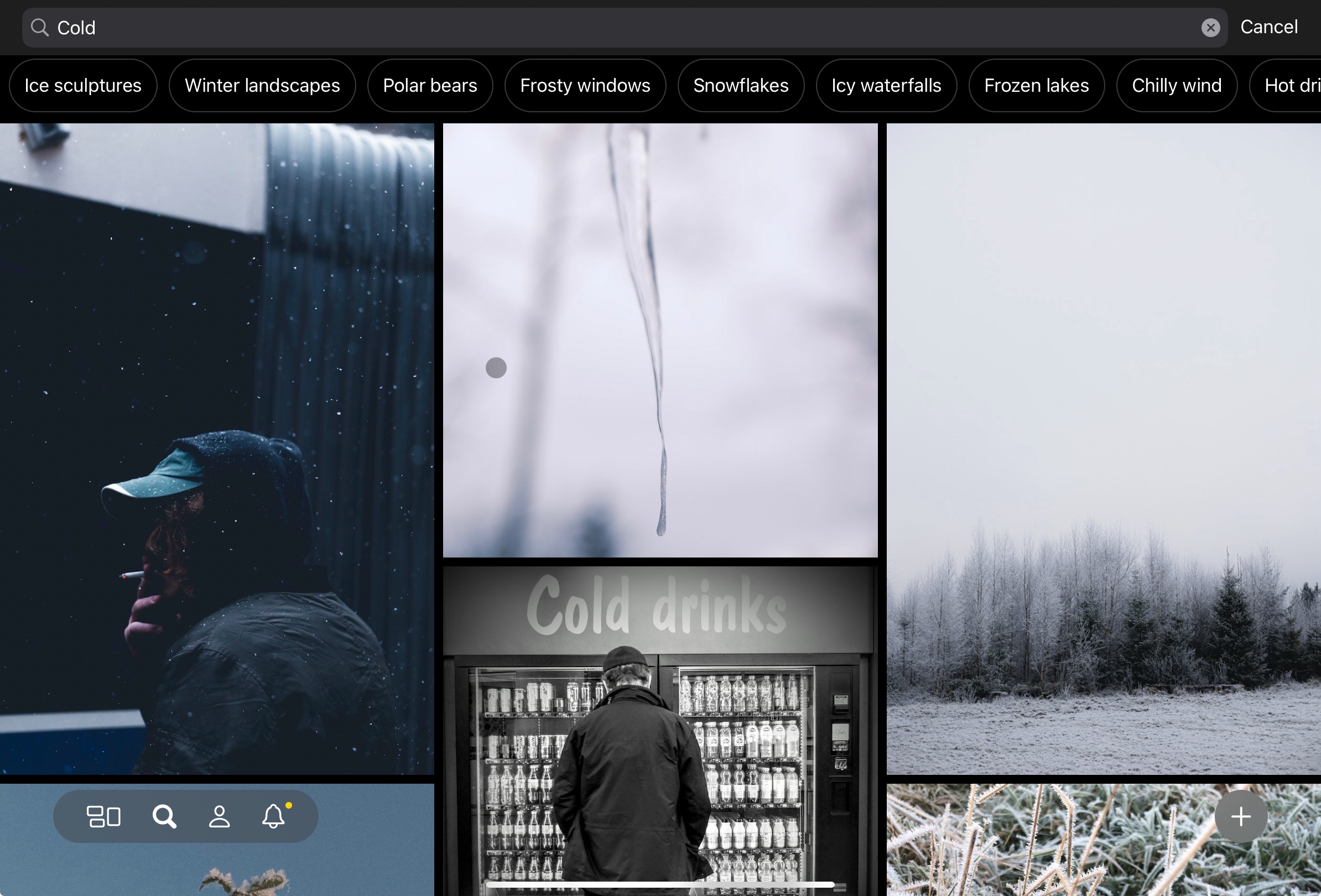
Doing a search for ‘cold’, however, and you get cold colours (i.e., blues) along with images of winter scenes. Sexualized female images are not presented.
Consider also some of the search queries which are authorized and how they return results:
‘slut’ which purely surfaces women
‘tasty’ which surfaces food images along with images of women
‘lover’ which surfaces images of men and women, or women alone. It is rare that men are shown on their own
‘juicy’ which tends to return images of fruit or of sexualized women
‘ugly’ which predominantly surfaces images of men
‘asian’ which predominantly returns images of sexualized Asian women
‘criminal’ which often appears linked to darker skin or wearing a mask
‘jew’ which (unlike Israeli) exclusively surfaces men for the first several pages of returned images
‘black’ primarily surfaces women in leather or rubber clothing
‘white’ principally surfaces white women or women in white clothing
Note that I refrained from any particularly offensive queries on the basis that I wanted to avoid taking any actions that could step over an ethical or legal line. I also did not attempt to issue any search queries using a language other than English. All queries were run on October 15, 2023 using my personal account with the platform.
Steps Forward
There are certainly images of women who have been published on Glass and this blogpost should not be taken as suggesting that these images should be removed. However, even running somewhat basic queries reveal that (at a minimum) there is an apparent gender bias in how some tags are associated with men or women. I have only undertaken the most surface level of queries and have not automated searches or loaded known ‘problem words’ to query against Glass. I also didn’t have to.
Glass’ development team should commit to pulling its computer vision/AI-based search back into a beta or to pull the system entirely. Either way, what the developers have pushed into production is far from ready for prime time if the company—and the platform and its developers—are to be seen as promoting an inclusive and equitable platform that avoids reaffirming historical biases that are regularly engrained in poorly managed computer vision technologies.
Glass’ developers have previously shown that they deeply care about getting product developments right and about fostering a safe and equitable platform. It’s one of the reasons that they are building a strong and healthy community on the platform. As it stands today, however, their AI-powered search function violates these admirable company values.
I hope that the team corrects this error and brings the platform, and its functions, back into comportment with the company’s values rather than continue to have a clearly deficient product feature deployed for all users. Maintaining the search features, as it exists today, would undermine the team’s efforts to otherwise foster the best photographic community available on the Internet, today.
Glass’ developers have shown attentiveness to the community in developing new features and fixing bugs, and I hope that they read this post as one from a dedicated and committed user who just wants the platform to be better. I like Glass and the developers’ values, and hope these values are used to undergird future explore and search functions as opposed to the gender-biased values that are currently embedded in Glass’ AI-empowered search functions.
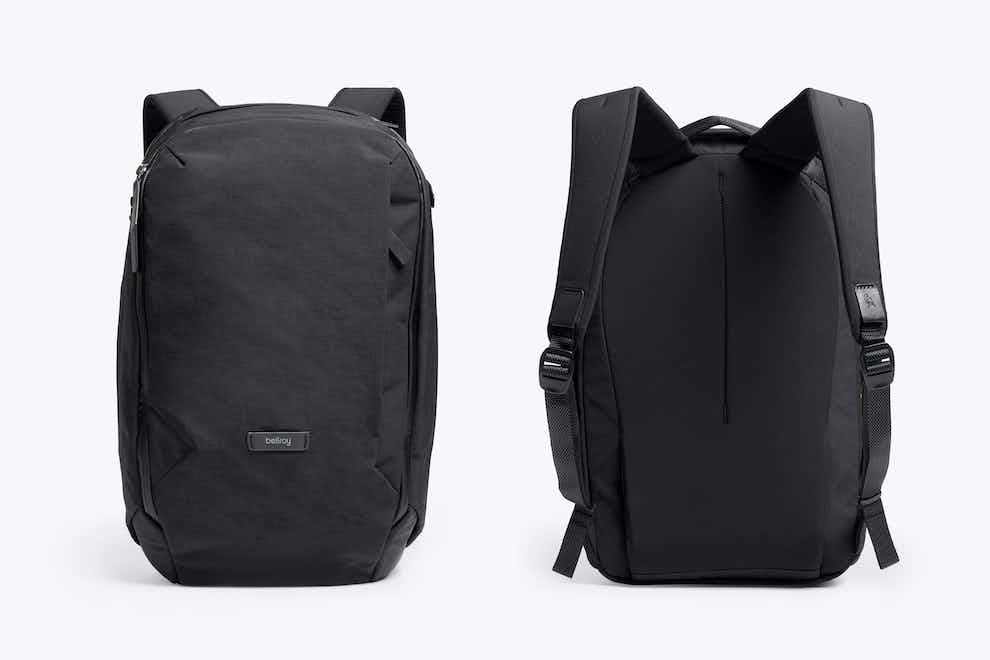
I’ve been using the Bellroy Transit Workpack daily for about 3 weeks now to carry my stuff to and from work. It’s a 20L backpack that can hold up to a 16″ laptop. For the weekdays, I use the bag to carry devices to/from work, and to bring my lunch, coffee thermos, and other miscellaneous things on a daily basis. On the weekend, I use it to carry some camera gear, light jacket or vest, and to pick up small things when I’m out.
The Good
I’ve found that it fits well once the excess shoulder straps are tightened, and appreciate how the included clips hold down excessive straps on the shoulders. Once tightened the bag is nicely snug to my back. My normal weekday carry is a 13” laptop, iPad, lunch, water bottle, keys, miscellaneous small electronics, books or shoes, and sometimes a spare jacket. All of this fits easily and comfortably in the bag without it appearing stretched or overloaded.
On the weekend, I regularly use the bag to carry a compressible jacket or vest, various camera batteries, and to pick up small things to bring home.
A couple fun facts:
You can easily fit two very large fresh-baked loaves of bread in the main compartment with no problems and they’ll come back in great condition with some room on the top of the main compartment for other baked goods, and
The ‘tech sleeve’ in the laptop compartment can easily (and safely) hold a Fuji X100F and even when it has a hood attached to the lens.
During my time with the bag I’ve worn it through rain and heavy snow. While the zippers require a bit more force to pull than those on other backpacks, the same zippers (and material used in the backpack) means that water just flows off the bag. All of which is to say that my electronics and other valuables haven’t ever gotten wet. This includes in situations where I’ve accidentally set the bag down on very wet floors: not once has a drop of moisture gotten past the bag’s exterior.
The bag also stands on its own pretty well, so long as it’s not overly weighted in one direction or another and has at least a little bit of stuff in the main compartment. The pen loops in the front compartment are helpful and not something I realised were included in the bag when I bought it.
Finally, the backpack it light. I’ve been using a much heavier backpack every now and then for the past few years (my daily carry has been a messenger bag for several years) and I really can’t believe just how light and robust the Bellroy Transit Workpack is compared to either my backpack or messenger!
The Bad
There are a few relatively minor downsides to the bag. First, the front pouch: it’s not the most convenient for storing things, though I do appreciate the small ‘lip’ that’s used to keep some items from moving around.
Second, the key elastic being in one of the water bottle pouches makes it pretty impractical for how I use the bag. Also, getting a water bottle into the hidden side-holders can sometimes be a bit of a pain (bad) but once in the holder the liquid is kept away from stuff on the bag’s internal compartment (good!) and preserves the look of the bag (also good!).
Third, the Transit Workpack lacks a luggage pass through so if you wanted to put this on your luggage while moving through an airport you’re going to be out of luck.
Fourth, it has taken me a few months to figure out how to use the webbing straps that come with the bag. Until I have, the straps kept coming loose and I’d have to reset them every few days. This is really, really annoying and if there’s a flaw with the backpack it’s the idiotic strapping system the Bellroy has gone with.
Finally, if you weigh the bag down and are carrying it for a long period of time (defined as 3 hours) you really need to ensure the straps are at the right length and tightness to best allocate the weight. Doing otherwise will leave you with some very sore shoulders!
Purchasing
I bought my Transit Workpack from a local Toronto company, Te Koop. The shipping was prompt and engagement from staff has been excellent, with staff having reached out several times to confirm that I’m happy with the backpack as well as to inform me about any return policies should I need it retained. I’m very happy to have purchased my bag from them.
Concluding Thoughts
If you’re an office worker, or someone looking for a sleek and easy-to-pack backpack, then I’d recommend this for you.
I’ve been actively using Glass for about a full year now. Glass is a photo sharing site where users must pay either a monthly or yearly fee; it costs to post but viewing is free.
I publish a photo almost every day and I regularly go through the community to view other folks’ photos and comment on them. In this short review I want to identify what’s great about the service, what’s so-so, and where there’s still room to grow. All the images in this blog post were previously posted to Glass.
Let me cut to the chase: I like the service and have resubscribed for another full year.
The Good
The iOS mobile client was great at launch and it remains terrific. It’s fast and easy to use, and beats all the other social platforms’ apps that I’ve used because it is so simple and functional. You can’t edit your images in the Glass app and I’m entirely fine with that.
(Fix, Found by Christopher Parsons)
The community is delightful from my perspective. The comments I get are all thoughtful and the requirement to pay-to-post means that there aren’t (yet) any trolls that I’ve come across. Does this mean the community is smaller? Definitely. But is it a more committed and friendly community? You bet. Give me quality over quantity any day of the week.
All subscribers have the option to have a public facing profile, which anyone can view, or ones that are restricted to just other subscribers. I find the public profiles to be pretty attractive and good at arranging photos, especially when accessing a profile on a wide-screen device (e.g. a laptop, desktop, tablet, or phone in landscape).
The platform launched as iPhone only, to start, though has been expanding since then. The iPad client is a joy to use and the developers have an Android client on their roadmap. A Windows application is available and you can use the service on the web too.
(Birthday Pose by Christopher Parsons)
Other things that I really appreciate: Glass has a terrifically responsive development team. There are about 50 community requests that have been implemented since launch; while some are just for bugs, most are for updates to the platform. Glass is also the opposite of the traditional roach-motel social media platform. You can download your photos from the site at any time; you’re paying for the service, not for surveillance. That’s great!
The So-So
So is Glass perfect then? No. It has only a small handful of developers as compared to competitors like Instagram or Vero which means that some overdue features are still in development.
(‘Til Pandemic Does Us Part by Christopher Parsons)
A core critique is there is no Android application. That’s fair! However, iOS users are more likely to spend money on apps so it made economic sense to prioritize that user base.1 Fortunately an Android application is on its way and a Windows version was recently released.
A more serious issue for existing users is an inability to ‘tag’ photos. While photos can be assigned to categories in the application (and more categories have been added over time) that means it’s hard to have the customization of bigger sites like Flickr. The result is that discovery is more challenging and it’s harder to build up a set of metadata that could be used in the future for presenting photos. Glass, currently, is meant to provide a linear feed of photos—that’s part of its charm!—but more sophisticated methods of even displaying images on users’ portfolios in the future may require the company to adopt a tagging system. Why does it matter that there is or isn’t one, today? Because for heavier users2 re-viewing and tagging all photos will be a royal pain in the butt, if that ever is something that is integrated into the platform.
(Tall and Proud by Christopher Parsons)
If you’re looking to use Glass as a formal portfolio, well, there are almost certainly better services and platforms you should rely upon. Which is to say: the platform does not let you create albums or pin certain photos to the top of your profile. I entirely get that the developers are aiming for a simple service at launch, but would also appreciate the ability to better categorize some of my photos. In particular, I would like to create things such as:
Best of a given year
Having albums that break up street versus landscape versus cityscape images
Being able to create albums for specific events, such as particular vacations or documentary events
Photos that I generally think are amongst my ‘best’ overall
This being said, albums and portfolios are in the planning stages. I look forward to seeing what is ultimately released.
(Public Praise by Christopher Parsons)
As much as I like the community as it stands today, I would really like the developers to add some small or basic things. Like threaded comments. They’re coming, at some point, after discovery features are integrated (e.g., search by location, by camera, etc.). Still, as it stands today, the lack of even 2-levels of threaded comments means that active conversations are annoying to follow.
Finally, Glass is really what you make of it. If you’re a photographer who wants to just add photos and never engage with the community then I’d imagine it’s not as good as a platform such as Instagram or Vero. Both of the latter apps have larger user bases and you’re more likely to get the equivalent of a like; I don’t know how large Glass’ user-base is but it’s not huge despite being much larger than at launch. However, if you’re active in the community then I think that you can get more positive, or helpful, feedback than on other platforms. At least for me, as a very enthusiastic amateur photographer, the engagement I get on Glass is remarkably more meaningful than on any other platform on which I’ve shared my photographs.
The Bad
Honestly, the worst part about Glass is still discoverability.3 You can see a semi-random set of photographers using the service which isn’t bad…except that some of them may not have posted anything to the platform for months or even a year. I have no idea why this is the case.
(Stephanie by Christopher Parsons)
The only other way to discover other photographers is to regularly dig through the different photography categories, and ‘appreciate’4 photos you see and follow the photographers who appeal to your tastes. This isn’t terrible, but it’s the ‘best’ way of discovering photos and really isn’t great. While the company ‘highlights’ photographers on the Glass website and through its Twitter feed, the equivalent curation still doesn’t exist in the application itself. That’s non-ideal.
The developers have promised that additional discovery functions will be rolling out. They intend enable search by camera type or location, but thus far nothing’s been released. They’ve been good at slowly and deliberately releasing features, and new features have always been thoughtful when implemented, so I’m hopeful that when discoverability is updated it’ll be pretty good. Until then, however, it’s frankly pretty bad.
(Lonely Traveller by Christopher Parsons)
If I were to find a second thing that’s missing, to date, it would be that there’s no way of embedding Glass images in other CMSes. The platform does support RSS, which I appreciate, but I want the platform to offer full-on embeds so I can easily cross post images to other web spaces (like this blog!). Embeds could, also, have some language/links that ultimately let viewers sign up for the service as a way of growing the subscriber base.
The third thing that I wish Glass would enable a way of assessing if a photo has already been uploaded. At this point I’ve uploaded over 300 photos and I want to ensure that I don’t accidentally upload a duplicate. This is definitely a problem associated with those who use the service more heavily, but will become a more prominent issue as users ‘live’ on the platform for more and more years.
Conclusion
So, at the end of a year, what do I think of Glass?
First, I think that it truly is a photography community for photographers. It isn’t trying to be a broader social network that lets you share what music you’re listening to, or TV shows and movies you’re watching, or books you’ve finished, or temporary stories or images. There is totally a space for a network like that but it’s not Glass and I’m fine with it being a simpler and more direct kind of platform.
(Night Light by Christopher Parsons)
Second, it is a platform with active developers and a friendly community. Both of those things are pretty great. And the developers have a clear and opinionated sense of taste: they’re creating a beautiful application and associated service. There’s real value in the aesthetic for me.
Third, it’s not quite the place to showcase your work, today, if you are trying to semi-professionally market your photography. There are no albums or other ways of highlighting or collecting your images. Glass is much closer to the original version of Instagram in just presenting a feed of historical images instead of a contemporary service like Flickr or even Instagram. And…that’s actually a pretty great thing! That said, the roadmap includes commitments to enabling better highlighting/collecting of images. This will be increasingly important as more people upload more photographs to the service.
(Supervisory Assistance by Christopher Parsons)
Fourth, it’s still relatively cheap as compared to other paid offerings. It is less than half the cost of a Flickr Pro account, as just one example. And there are no ads for subscribers or for individuals who are browsing public profiles and associated portfolios.
(Distressed by Christopher Parsons)
So, in conclusion, I’d strongly suggest trying out Glass if you’re a committed and enthusiastic amateur. It’s not the same as Instagram or Instagram clones. That’s both part of the point and part of the magic of the platform that the Glass team is creating and incubating.
Yes, you might be willing to pay money, dear reader, but you’re statistically deviant. In a good way! ↩︎
The developers are, also, very well aware of this issue. ↩︎
Glass does not have ‘likes’ per se, but lets users click an ‘appreciation’ button. Appreciations are only ever sent to the photographer and are not accumulated numerically to be presented to either the public or the photographer who uploaded the photograph. ↩︎
A couple thoughts after shooting with the iPhone 14 Pro for a day, as an amateur photographer coming from an iPhone 12 Pro and who also uses a Ricoh GR and Fuji X100F.
The 48 megapixel 24mm (equiv.) lens is nearly useless for street photography, when capturing images at 48 megapixels. It takes 1+ seconds to capture an image at this resolution. That’s not great for trying to catch a subject or scene at just the right moment. (To me, this says very, very bad things about what Apple Silicon can actually do.) Set the captured resolution to 12 megapixels in ProRAW if you’re shooting fast-moving or fast-changing subjects/scenes.
The 78mm (equiv.) telephoto is pretty great. It really opens a new way of seeing the world for me. I also think it’s great for starting street photographers who aren’t comfortable being as close as 28mm or 35mm might require.
The new form factor means the MagSafe-compatible battery I use doesn’t fit. Which was a pretty big surprise and leads into item 4…
Capturing 48 megapixel images, at full resolution, while using your phone in bright daylight (and thus raising the screen to full brightness), absolutely destroys battery life. Which means you’re likely to need a battery pack to charge your phone during extended photoshoots. Make sure you choose one that’s the right size!
I like the ability to use the photographic styles. But it really sucks that you can’t see what effect they’d have on monochrome/black and white images. I shoot 95-99% in monochrome; this is likely less of an issue for other folks.
The camera app desperately needs an update and reorganization. It is kludgy and a pain in the ass to use if you need to change settings quickly on the street. Do. Not. Like. It’s embarrassing Apple continues to ship such a poor application.
I haven’t taken the phone out to shoot extensively at night, though some staged shots at home at night showcase how much better night mode is compared to that in the iPhone 12 Pro.
Anyway, early thoughts. More complete ones will follow in the coming week or so.
When you set up a custom iCloud email domain you have to modify the DNS records held by your domain’s registrar. On the whole, the information provided by Apple is simple and makes it easy to set up the custom domain.
However, if you change where your domain’s name servers point, such as when you modify the hosting for a website associated with the domain, you must update the DNS records with whomever you are pointing the name servers to. Put differently: if you have configured your Apple iCloud custom email by modifying the DNS information at host X, as soon as you shift to host Y by pointing your name servers at them you will also have to update DNS records with host Y.
Now, what if you don’t do this? Eventually as DNS information propagates over the subsequent 6-72 hours you’ll be in a situation where your custom iCloud domain email address will stop sending or receiving information because the routing information is no longer valid. This will cause Apple’s iCloud custom domain system to try and re-verify the domain; it will do this because the DNS information you initially supplied is no longer valid.
Should you run into this issue you might, naturally, first reach out to Apple support. You are, after all, running your email through their servers.
Positively: you will very quickly get a real-live human on the phone to help you. That’s great! Unfortunately, however, there is very little that Apple’s support staff can do to help you. There are very, very few internal help documents pertaining to custom domains. As was explained to me, the sensitivity and complexity of DNS (and the fact that information is non-standardized across registrars) means that the support staff really can’t help much: you’re mostly on your own. This is not communicated when setting up Apple custom email domains.
In a truly worst case scenario you might get a well meaning but ignorant support member who leads you deeply astray in attempting to help troubleshoot and fix the problem. This, unfortunately, was my experience: no matter what is suggested, the solution to this problem is not solved by deleting your custom email accounts hosted by Apple on iCloud. Don’t be convinced this is ever a solution.
Worse, after deleting the email accounts associated with your custom iCloud domain email you can get into a situation where you cannot click the re-verify button on the front end of iCloud’s custom email domain interface. The result is that while you see one thing on the graphical interface—a greyed out option to ‘re-verify’—folks at Apple/server-side do not see the same status. Level 1 and 2 support staff cannot help you at this stage.
As a result, you can (at this point) be in limbo insofar as email cannot be sent or received from your custom domain. Individuals who send you message will get errors that the email identify no longer exists. The only group at Apple who can help you, in this situation, are Apple’s engineering team.
That team apparently does not work weekends.
What does this mean for using custom email domains for iCloud? For many people not a lot: they aren’t moving their hosting around and so it’s very much a ‘set and forget’ situation. However, for anyone who does have an issue the Apple support staff lacks good documentation to determine where the problem lies and, as a result, can (frankly) waste an inordinate amount of time in trying to figure out what is wrong. I would hasten to note that the final Apple support member I worked with, Derek, was amazing in identifying what the issue was, communicating the challenges facing Apple internally, and taking ownership of the problem: Derek rocks. Apple support needs more people like him.
But, in the absence of being able to hire more Dereks, Apple needs better scripts to help their support staff assist users. And, moreover, the fact that Apple lacks a large enough engineering team to also have some people working weekends to solve issues is stunning: yes, hiring is challenging and expensive, but Apple is one of the most profitable companies in the world. Their lack of a true 24/7 support staff is absurd.
What’s the solution if you ever find yourself in this situation, then? Make sure that you’ve done what you can with your new domain settings and, then, just sit back and wait while Apple tries to figure stuff out. I don’t know how, exactly, Apple fixed this problem on their end, though when it is fixed you’ll get an immediate prompt on your iOS devices that you need to update your custom domain information. It’s quick to take the information provided (which will include a new DKIM record that is unique to your new domain) and then get Apple custom iCloud email working with whomever is managing your DNS records.
Ultimately, I’m glad this was fixed for me but, simultaneously, the ability of most of Apple’s support team to provide assistance was minimal. And it meant that for 3-4 days I was entirely without my primary email address, during a busy work period. I’m very, very disappointed in how this was handled irrespective of things ultimately working once again. At a minimum, Apple needs to update its internal scripts so that their frontline staff know the right questions to ask (e.g., did you change information about your website’s DNS information?) to get stuff moving in the right direction.
The founders of the photography application, Glass, were recently on Protocol’s Source Code. Part of what they emphasized, time and time again, was the importance of developing a positive community where photographers interacted with one another.
Indeed, just today one of the photographers I most respectposted an image that I found really spectacular and we had a brief back and forth about what I saw/emotions it evoked, and his reaction to my experience of it. I routinely have these kinds of positive and meaningful back-and-forths on Glass. That’s not to say that similar experiences don’t, and can’t, occur on other companies’ platforms! But, from my own point of view, Glass is definitely creating the experiences that the developers are aiming for.
I also think that the developers of Glass are serious in their commitment to taking ideas from their community. I’d proposed via their ticketing system that they find a way of showcasing the excellent blog content that they’re producing, and that’s now on their roadmap for the application.
It’s also apparent that the developers, themselves, are involved in the application and watching what people are posting to showcase great work. They’ve routinely had excellent and interestinginterviews with photographers on the platform, as well as highlightedphotos that they found interesting each month in the categories that they have focused on (in interests of disclosure, one of my photos was included in their Cityscapes collection).
These are, admittedly, the kinds of features and activities that you’d hope developers to roll out and emphasize as they build a photography application and grow its associated community. Even the developers of Instagram, when it was still a sub-10 person shop were pretty involved in their community! I can only hope that Glass never turns into their Meta ‘competitor’!
Xiaowei Wang’s book, Blockchain Chicken Farm And Other Stories of Tech in China’s Countryside, presents a nuanced and detailed account of the lives reality of many people in China through the lenses of history, culture, and emerging technologies. She makes clear through her writing that China is undergoing a massive shift through efforts to digitize the economy and society (and especially rural economies and societies) while also effectively communicating why so many of these initiatives are being undertaken.
From exploring the relationship between a fraught cold chain and organic chicken, to attempts to revitalize rural villages by turning them into platform manufacturing towns, to thinking through and reflecting on the state of contemporary capitalistic performativity in rural China and the USA alike, we see how technologies are being used to try and ‘solve’ challenges while often simultaneously undermining and endangering the societies within which they are embedded. Wang is careful to ensure that a reader leaves with an understanding of the positive attributes of how technologies are applied while, at the same time, making clear how they do not remedy—and, in fact, often reify or extenuate—unequal power relationships. Indeed, many of the positive elements of technologies, from the perspective of empowering rural citizens or improving their earning powers, are either being negatively impacted by larger capitalistic actors or the technology companies whose platforms many of these so-called improvements operate upon.
Wang’s book, in its conclusion, recognizes that we need to enhance and improve upon the cultural spaces we operate and live within if we are to create a new or reformed politics that is more responsive to the specific needs of individuals and their communities. Put differently, we must tend to the dynamism of the Lifeworld if we are to modify the conditions of the System that surrounds, and unrelentingly colonizes, the Lifeworld.
Her wistful ending—that such efforts of (re)generation are all that we can do—speaks both to a hope but also an almost resignation that (re)forming the systems we operate in can only take place if we manage to avoid being distracted by the bauble or technology that is dangled in front of us, to distract us from the existential crises facing our societies and humanity writ large. As such, it concludes very much in the spirit of our times: with hope for the future but a fearful resignation that despite our best efforts, we may be too late to succeed. But, what else can we do?
I bought an iPhone 12 Pro mid-cycle in March 2021 and have been shooting with it for the past several months in a variety of weather conditions. I was very pleased with the iPhone 11 Pro with the exception of the green lens flares that too-frequently erupt when shooting with it at night. Consider this a longish-term review of the 12 Pro with comparisons to the 11 Pro, and scattered with photos taken exclusively with the 12 Pro and edited in Apple Photos and Darkroom on iOS.
Background
I’m by definition an amateur photographer; I shoot using my iPhone as well as a Fuji X100F, and get out to take photos at least once or twice a week during photo walks that last a few hours. I don’t earn any money from making photos and shoot with it for my own personal enjoyment. Most of my photos are street or urban photography, with a smattering of landscape shots and photos of friends and family thrown in.
To be clear up front: this is not a review of the iPhone 12 Pro, proper, but just the camera system. This said, it’s worth noting that the hardware differences between the iPhone 11 Pro and 12 Pro are pretty minor. The 26mm lens is now f/1.6 and the 13mm can be used with night mode. At a software level, the 12 Pro introduced the ability to shoot Apple ProRAW and introduced Smart HDR 3, as well as Deep Fusion to improve photographic results in low to middling light. Deep Fusion, in particular, has no discernible effect on the shots I take, but maybe I’m just not pixel peeping enough to see what it’s doing.
For the past few years I’ve shot with a number of cameras, including: an iPhone 6 and 7, and 11 Pro, a Fuji X100 and 100F, a Sony RX1002, and an Olympus EM10ii. I’ve printed my work in a couple personal books, and also printed photos from all these systems at various sizes and hang the results on my walls. When I travel it’s with a camera or two in tow. If you want a rough gauge of the kinds of photos I take you might want to take a gander at my Instagram.
Also, while I own a bunch of cameras, photos are my jam. I’ll be focusing mostly on how well the iPhone 12 Pro makes images with a small aside to talk about its video capabilities. For more in-depth technical reviews of the 12 Pro I’d suggest checking out Halide’s blog.
The Body
The iPhone 11 Pro had a great camera system but it was always a bit awkward to hold the phone when shooting because of its rounded edges. Don’t get me wrong, it helped the phone feel more inviting than the 12 Pro but was less ideal for actual daily photography and I find it easier to get, and retain, a strong grip on the 12 Pro. Your mileage may vary.
I kept my 11 Pro in an Apple silicon case and I do the same for the 12 Pro. One of the things I do with some regularity is press my phone right against glass to reduce glare when I’m shooting through a window or other transparent substance. With the 12 Pro’s silicon case I can do this without the glass I’m pressed against actually touching the lens because there’s a few millimetres between the case and the lens element. The same was also true of my 11 Pro and the Apple silicon case I had attached to it.
I like the screen of the 12 Pro, though I liked the screen in the 11 Pro as well. Is there a difference? Yeah, a bit, insofar as my blacks are more black on the 12 Pro but I wouldn’t notice the difference unless the 11 Pro and 12 Pro were right against one another. I can see both clearly enough to frame shots in sunny days while shooting which is what I really care about.
While the phone doesn’t have any ability to tilt the screen to frame shots, you can use a tripod to angle your phone and then frame and shoot using an Apple Watch if you have one. It’s a neat function and you can actually use an Apple Watch as a paired screen if you’re taking video using the main lenses. I tend to shoot handheld, however, and so only have used the Apple Watch trick when shooting a video using the main cameras on the back of the 12 Pro.
I don’t ever really use the flash so I can’t comment on it, though I do occasionally use the flash as a light to illuminate subjects I’m shooting with another camera. It’s not amazing but it works in a pinch.
The battery is so-so based on my experience. The 12 Pro’s battery is a tad smaller than the one in my 11 Pro, which means less capacity, though in the five months I’ve owned the 12 Pro the battery health hasn’t degraded at all which wasn’t the case with the 11 Pro. This said, if I’m out shooting exclusively with the 12 Pro I’m going to bring a battery pack with me just like when I went out for a day of shooting with the 11 Pro. If it’s not a heavy day of shooting, however, I reliably end the day with 20% or more battery after the 12 Pro has been off the charger for about 14-17 hours with middling usage.
Probably the coolest feature of the new 12 series iPhones is their ability to use magnetic attachments. I’ve been using a Luma Cube Telepod Tripod stand paired with a Moment Tripod Mount with MagSafe. It’s been pretty great for video conferences and is the coolest hardware feature that was added to the 12-line of phones in my opinion. It’s a shame that there isn’t a wider ecosystem supporting this hardware feature this many months after release.
Camera App
The default Apple camera app is fine, I guess. I like that you can now set the exposure and the app will remember it, which has helpfully meant that I can slightly under-expose my shots by default as is my preference. However, the default app still lacks a spirit guide which is really, really, really stupid, and especially so in a so-called “Pro” camera that costs around $2,000 (CAD) after Apple Care, a case, and taxes. It’s particularly maddening given that the phone includes a gyroscope that is used for so many other things in the default camera app like providing guidance when taking pano shots or top-down shots, and so forth.
It’s not coming back, but I’m still annoyed at how Apple changed burst mode in iOS. It used to be you could hold the shutter button in the native camera app or the volume rocker to active a burst but now you hold the shutter button and pull it to the left. It’s not a muscle memory I’ve developed and also risks screwing up my compositions when I’m shooting on the street so I don’t really use burst anymore which is a shame.
As a note, I edit almost all my photos in the Darkroom extension for Photos. It crashes all the damn time and it is maddening. I’d hoped these crashes would go away when I upgraded from the 11 Pro to the 12 Pro but they haven’t. It is very, very, very frustrating. And the crashes happen all the damn time.
Image Quality
In a theoretical world upgrading my camera would lead to huge differences in image quality, but in practice that’s rarely the case. It is especially not the case when shifting from the 11 Pro to the 12 Pro, save for in very particular situations. The biggest change and improvement that is noticeable in daily situations is when you’re shooting scenes where there is significant dynamism in the scene, such as when you’re outside on a bright day; the sky and the rest of the scene are kept remarkably intact without your highlights or shadows being blown out. Even when compared to a camera with an APS-C or Micro 4/3 sensor it’s impressive, and I can get certain bright day shots with the iPhone 12 Pro that wouldn’t be possible to easily capture with my Fujifilm X100F or Olympus EM10ii.
The other upgrade is definitely that, due to sensor and computational power, you can get amazing lowlight shots using the ultra-wide lens using Night Mode. Shots are sometimes a bit noisy or blotchy but still I can get photos that are impossible to otherwise get handheld with an APS-C sensor.
Relatedly, the ultra-wide’s correction for distortion is pretty great and it’s noticeably better than the ultra-wide lens correction on the 11 Pro. If you’re shooting wide angle a lot then this is likely one of the few software improvements you’ll actually benefit from with some regularity.
One of the most heralded features of the 12 Pros was the ability to shoot ProRaw. In bright conditions it’s not worth using; I rarely detect a noticeable improvement in quality nor does it significantly enhance how I can edit a photo in those cases. However, in darker situations or more challenging low-light indoor situations it can be pretty helpful in retaining details that can be later recovered. That said, it hasn’t transformed how I shoot per se; it’s a nice-to-have, but not something that you’re necessarily going to use all the time.
You might ask how well portrait mode works but, given that I don’t use it that often, I can’t comment much beyond that it’s a neat feature that is sufficiently inconsistent that I don’t use it for much of anything. There are some exceptions, such as when shooting portraits at family events, but on the whole I remain impressed with it from a technology vantage point while being disappointed in it from a photographer’s point of view. If I want a shallow depth of field and need to get a shot I’m going to get one of my bigger cameras and not risk the shot with the 12 Pro.
Video
I don’t really shoot video, per se, and so don’t have a lot of experience with the quality of video production on it. Others have, however, very positively discussed about the capabilities of the cameras and I trust what they’ve said.
That said, I did a short video for a piece I wrote and it turned out pretty well. We shot using the ‘normal’ lens at 4K and my employer’s video editor subsequently graded the video. This was taken in low-light conditions and I used my Apple Watch as a screen so I could track what I was doing while speaking to camera.
I’ve also used my iPhone 12 Pro for pretty well all the numerous video conferences, government presentations (starting at 19:45), classes I’ve taught, and media engagements I’ve had over the course of the pandemic. In those cases I’ve used the selfie camera and in almost all situations persons on the other side of the screen have commented on the high quality of my video. I take that as a recommendation of the quality of the selfie cameras for video-related purposes.
Frustrations
I’ll be honest: what I most hoped would be better with the iPhone 12 Pro was that the default Photos app would play better with extensions. I use Darkroom as my primary editing application and after editing 5-10 photos the extension reliably crashes and I need to totally close out Photos before I can edit using the extension again.1 It is frustrating and it sucks.
What else hasn’t improved? The 12 Pro still has green lens flares when I take photos at night. It is amazingly frustrating that, despite all the computing power in the 12 Pro, this is an issue that Apple’s software engineers can’t fix given the current inability of their hardware engineers to resolve the issue. Is this a problem? Yes, it is, especially if you ever shoot at night. None of my other-less expensive-cameras suffer from this, and it’s maddening the 12 Pro still does. It’s made worse by the fact that the Photos app doesn’t include a healing tool to remove these gross little flares and, thus, requires me to use another app (typically Snapseed) to get rid of them.
Finally, I find that the shots with the 12 Pro are often too sharpened to my preference, which means that I tend to turn down the clarity in Darkroom to soften a lot of the photos I take. It’s an easy fix, though (again) not one you can correct in the default Photos application.
Conclusion
So what do I think of the iPhone 12 Pro? It’s the best non-Fuji X100F that I typically have when I’m out and about, and the water resistance means I’m never worried to shoot with it in the elements.2
If I have a choice, do I shoot with the Fuji X100F or the iPhone 12 Pro? If a 35mm equivalent works, then I shoot with the Fuji. But if I want a wide angle shot it’s pretty common for me to pull the 12 Pro and use it, even while out with the Fuji. They’ve got very different colour profiles but I still like using them both. Sometimes I even go on photowalks with just the 12 Pro and come back with lots of keepers.
This is all to say that the X100F and 12 Pro are both pretty great tools. I’m a fan of them both.
So…is the 12 Pro a major upgrade from the 11 Pro? Not at all. A bigger upgrade from earlier iPhones? Yeah, probably more so. I like the 12 Pro and use it everyday as a smartphone, and I like it as a camera. I also liked the 11 Pro as a portable camera and phone as well.
Should you buy the 12 Pro? Only if you really want the telephoto and the ability to edit ProRaw files. If that’s not you, then you’re probably going to be well off saving a chunk of change and getting the regular 12, instead.
(Note: All photos taken with an iPhone 12 Pro and edited to taste in Apple Photos and Darkroom.)
Yes, I can edit right in Darkroom, and I do, but it’s not as convenient. ↩︎
I admit to not treating the X100F with a lot of respect but I don’t use it when it’s pouring rain. The same isn’t true of the iPhone 12 Pro. ↩︎
Jason Snell over at Six Colors recently asked the question, “Why does the Apple TV still exist?” In the course of answering the question, he noted that Apple TV lets consumers:
Play some games;
Use Homepods for a nice, if somewhat problematic, Atmos sound system;
He goes on to discuss some of the things that could make the Apple TV a bit better, including turning it into a kind of gaming system, make it better at doing HomeKit things, or maybe even something to do with WiFi. Key is that as Apple’s content has migrated to other platforms and AirPlay 2 has rolled out to manufacturers’ TVs there is less and less need to have an Apple TV to actually engage with Apple’s own content.
I think that Snell’s analysis misses out on a lot of the value add for Apple TV. It’s possible that some of the following items are a bit niche, but nevertheless I think are important to subsets of Apple customers.
Privacy: Smart TVs have an incredibly bad rap. They can monitor what you’re doing nor are they guaranteed updates for a long-time. Sure, some are ok, but do I trust a TV company to protect my privacy or do I trust a company that has massively invested its brand credibility in privacy? For me, I choose Apple over TCL, Sony, LG, or the rest.
Photo Screensavers: I use my Apple TV to display my photos, turning that big black box in my living room into a streaming photo frame. Whenever people are over they’re captivated to see my photos, and frankly I like watching photos go by and remind me of places I’ve been, people I’ve shared time with, and memories of past times. There’s nothing like it on any Smart TV on the market.
Reliable Updates: As Apple develops new features they can integrate them with TV environments vis-a-vis the Apple TV, meaning they’re not reliant on TV manufacturers to develop and push out updates that enable features that Apple thinks are important. Moreover, it means that when a security vulnerability is identified, Apple can control pushing out updates and, thus, reduce the likelihood that their customers are exploited by nefarious parties. TV manufacturers just don’t have the same class of security teams as Apple does.
Family Friendly: Look, it’s great that lots of TVs can stream Apple content and that you can throw your screen/content onto Smart TVs using AirPlay 2. But what about when not everyone has an iPhone on them, or you don’t want to let people onto the same wireless network that your TV is on? In those cases, an Apple TV means that people can find/show content, but avoid the aforementioned frustrations.
HomeKit: I know that Snell mentioned this, but I really think that it cannot be emphasized enough. Apple TV—and especially an updated one that may support Thread—will further let people control their Internet of Things in their home. Assuming that Thread is included in the new Apple TV, that’ll also make the Apple TV yet another part of the local mesh network that is controlling all the other things in the home and that’s pretty great.
Decent Profits: Apple TV has long been a premium product. While Apple won’t earn as much on the sale of an Apple TV as on an iPhone, they’ll earn a lot more than what is being made when someone buys a Sony, TCL, or LG TV.
Brand Lock-in: Let’s face it, if you have a lot of Apple products you’re increasingly likely to keep buying Apple products. And providing an alternative to Google or TV manufacturers’ operating systems is just another way that Apple can keep its customers from wandering too far outside of their product line and being tempted by the products developed and sold by their competitors.
On the whole, I think that there continues to be a modest market for Apple TV. I’d bet that the biggest challenge for Apple is convincing those who have abandoned their Apple TVs to come back, and for those who are using their Smart TVs to pick up an Apple TV that offers a lot of similar uses as their existing TV operating systems. That’ll be a bit easier if there are cool new things associated with a new Apple TV—such as positioning it as a gaming platform with AAA gaming titles—but regardless there is value in the Apple TV. The challenge will be communicating that value to Apple’s current and potential customers but, given their track record, I’m confident that’s a challenge that Apple’s teams can rise to!
Update: Snell catalogues many of the above reasons to get an Apple TV–as well as some others–in a new post based on what his readers told him.
I actually really like the remote, but recognize I’m in the minority. ↩︎












 Excited Pixels